Updated October 2026. Instagram’s music rules shift with Meta’s label deals, so everything below is dated and we re-check it every quarter.
You switched your Instagram to a business account, opened the Reels camera, and the songs were gone. Not all of them. The chart hits, the trending audio, the track you had saved for your next post. In their place sat a library of songs you had never heard of.
That is not a glitch, and your app does not need reinstalling. It is a licensing rule, and the moment it kicked in was the moment your profile became a business profile. Here is why it happens, what Meta gives you instead, and the one setting we change on every account we manage so our clients keep full music access.
Why can’t business accounts use music on Instagram?
The short answer is money, but not yours. Meta pays record labels and publishers for the music in Instagram’s licensed library, and those deals cover one kind of use. In Meta’s own words, the music “is intended for personal, non-commercial use.”
A business promoting itself on Instagram is commercial use. So Meta’s help page says that “certain business accounts and certain types of posts do not have access to the library.” A restaurant posting a reel of tonight’s special over a Billboard hit is, from the label’s point of view, an ad with an unlicensed soundtrack. Meta’s deal does not cover that, so the app removes the option before it becomes a problem.
Two details in that sentence matter more than most articles admit:
- Meta says “certain” business accounts, not all. The restriction is not a clean switch that flips for every business profile. We will get to what actually seems to decide it below.
- “Certain types of posts” are restricted no matter what account you have. Branded content and boosted posts need commercially cleared music whether you are a business, a creator, or a personal account.
The licensed library is also unavailable in some countries and regions, which is why a business owner in one place and a friend in another can see different song lists on the same day.
What you get instead: Meta’s Sound Collection
When your account loses the licensed library, Meta points you to its Sound Collection. This is the “music you have never heard of” library, and it is more useful than it first looks.
According to Meta, the Sound Collection gives access to over 14,000 songs and sounds that are royalty free and safe to use in Reels and Stories. The part that matters for a business: Meta states this content “can be used for commercial purposes like ads.” That means a reel you later boost, or a clip you cut into a Meta ad, keeps its audio instead of being muted the moment money touches it.
Where it lives in the app:
- Stories: swipe up, pick the Music sticker, and the Sound Collection shows when the licensed library is off.
- Reels: tap Audio in the Reels camera.
The honest downside is reach. Trending audio feeds the Reels algorithm’s “use this sound” discovery loop, and Sound Collection tracks are rarely trending. For most local businesses that is a small loss compared with the alternative, a muted post, but it is a loss, which is why the next section exists.
The fix we use on every account we manage: the Entrepreneur category
This is the part no ranking article has first-hand. When we take over a business account and the music is gone, we do not switch it to a creator account. We change the profile category.
Here is the exact procedure we run on the accounts we manage:
- Make it a professional public account. Settings > Account type and tools > Switch to professional account. Make sure the account is public, not private.
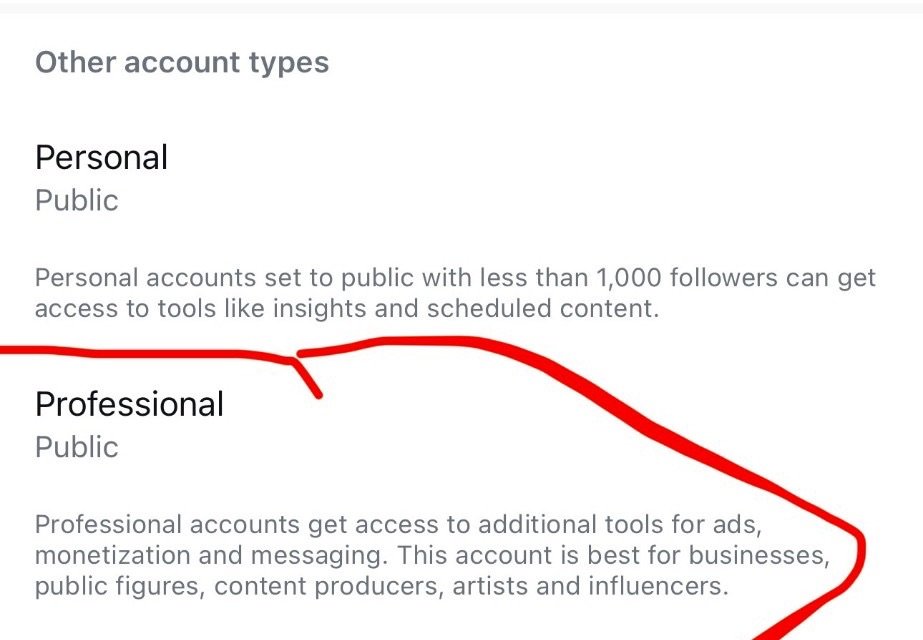
The Account type screen. Professional and public is the starting point; the category comes next. October 2026.
- Set the category to Entrepreneur. Edit profile > Category > search “Entrepreneur” and select it.
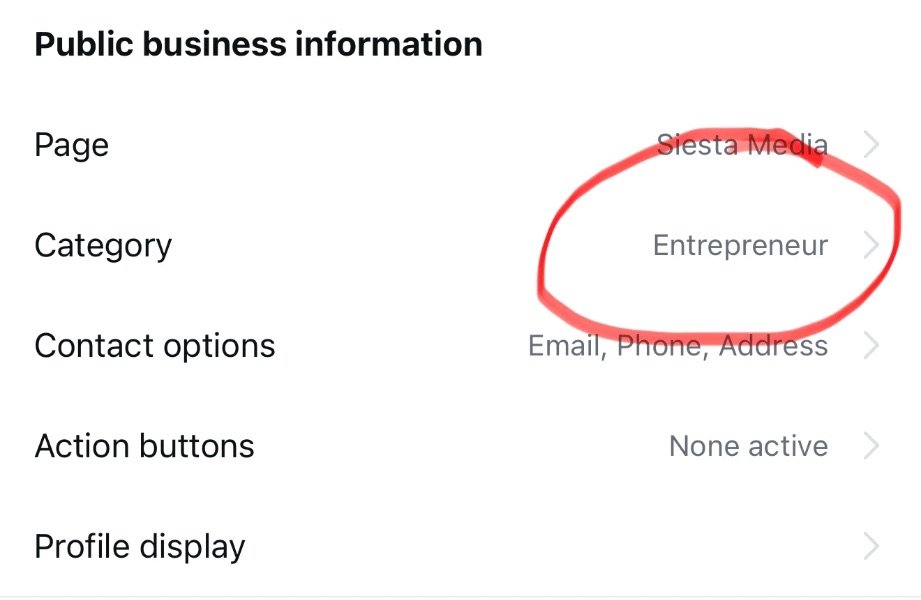
Our own account, @siestasocialmedia, on the setting we use everywhere: Category set to Entrepreneur. October 2026.
- Hide the category label if you want. Edit profile > Profile display > turn off “Display category label.” The word “Entrepreneur” disappears from your bio, but the setting stays.
- Reopen the Reels camera. The full licensed library, trending audio included, is usually back within a few minutes. If it is not, close the app fully and reopen it.
Why does this work? Meta does not say, and we are not going to pretend it has. Our working read is that the music gate keys off the profile category, not the business-versus-creator choice alone, because some categories (Local business, Restaurant, Travel website and similar) describe a commercial venue and others describe a person. “Certain business accounts,” in Meta’s phrasing, is consistent with that.
What we can say plainly:
- This is the setting every account we manage sits on. It has held through the last several rounds of Meta’s library changes.
- We have seen no downside. Reach, insights, ad tools, the link in bio, the contact buttons and the professional dashboard all stay. Your account is still a professional account.
- Meta can change it at any time. Music access is decided by licensing deals, not by Instagram’s product team, and those deals get renegotiated. If the fix stops working, the Sound Collection section above is still your safe fallback.
- Personal Blog is also reported to work. Several guides name it as a second category that keeps full music, and plenty of people search for it by name. We have verified Entrepreneur on our own accounts; treat Personal Blog as a second option to try if Entrepreneur does not fit your brand.
One category we know does not unlock the library: Local / Travel website. If you are on something like that and the music is missing, the category is the first thing to change.
Business vs. creator vs. personal: who gets which library
The advice you will find most often online is “switch to a creator account.” It usually works, but it is not free, and for a managed brand it is rarely the better move. Here is how the three account types behave in practice, as of October 2026:
- Personal account. Full licensed library. No insights, no ads, no contact buttons, no scheduling tools.
- Creator account. Full licensed library in most categories. Keeps insights and most pro tools; loses some business-only features such as the shop and some third-party scheduling integrations.
- Business account. Depends on category. Venue-style categories lose the licensed library and get Sound Collection; Entrepreneur keeps the full library. Keeps everything: insights, ads, shop, contact buttons, scheduling, the business API.
Meta’s published rule is only the sentence about “certain business accounts.” If you run a business page that uses the shop, a booking button, or a scheduling tool through the Instagram business API, switching to creator can quietly break one of them. Changing the category keeps all of that and still restores the music, which is why it is our default.
Royalty-free music for Instagram business accounts: the safe options
If you would rather not touch the category, or Meta changes the rule tomorrow, here is the order we would pick from.
- Meta’s Sound Collection. Free, inside the app, cleared for commercial use including ads. The weakest choice for reach, the strongest for safety. Start here for any post you might boost.
- A licensed subscription library. Services that sell a commercial license for social media use let you bring your own track as original audio. Read the license: some cover social posts but not paid ads, and most require the license to be in the name of the business posting.
- Original audio. Your own voice, the kitchen, the saw in the workshop, the waves behind the shop. On a business account this is often the best-performing option anyway. People stop for a real person talking more than for a trending track.
One warning about trending audio. Using a personally licensed trending song on a commercial post, for example by posting it from a personal account and reposting, or by recording the screen, puts the post on the wrong side of Meta’s agreements. Meta’s enforcement page is clear that videos “may be limited (example: muted or blocked),” and repeated claims on an account can follow it. A muted reel on a business page costs more than the song was ever worth.
Instagram music not showing all songs on a business account: quick checks
If the library is there but thin, or a specific song will not appear, run these in order before changing anything structural.
- Confirm the account type and category. Edit profile > Category. A venue-style category is the usual cause.
- Check the region. The licensed library is not available everywhere, and a song can be licensed in one country and not another. Meta’s page says so directly. A VPN does not fix this and can get the account flagged.
- Update the app, then force close it. Library changes ship in app updates, and a stale session can show the old list for hours.
- Look for a branded content tag. Posts marked as paid partnerships lose the licensed library regardless of account type. Remove the tag to test, then add the right disclosure back with cleared audio.
- Try a Story. Meta places no music limits on Stories. If the song appears in a Story but not a Reel, the restriction is on the post type, not the account.
Frequently asked questions
Why doesn’t my business Instagram have music?
Because Meta’s music licenses only cover personal, non-commercial use, and a business profile counts as commercial use. Meta’s help center says certain business accounts and certain post types do not get the licensed library. Changing the profile category to Entrepreneur restores it on the accounts we manage.
What happened to Instagram music? Did Instagram lose music rights?
No. Instagram still licenses music from the major labels and publishers. What people notice as “music disappearing” is one of two things: their account moved to a business profile and lost the licensed library, or a licensing renewal changed which songs are in the catalog that month. Both are licensing events, not a bug.
Can business accounts use trending audio on Instagram?
Only if the account still has the licensed library, which depends on its category. With the Entrepreneur category set, yes. With a venue-style category, the account is limited to the Sound Collection, and trending audio from the licensed library will not appear.
Can creator accounts use music on Instagram?
Yes, in most categories a creator account keeps the full licensed library. The trade is that a creator account gives up some business-only tools. For a managed brand, changing the category on the business account is usually the better fix.
How do I access music on my business account?
Settings > Account type and tools, make sure the account is professional and public. Then Edit profile > Category, choose Entrepreneur. Reopen the Reels camera. If the music is still missing, close the app fully and try again.
Is the Entrepreneur category fix allowed?
It is a category Meta offers to every professional account. Picking the one that describes you is a profile setting, not a workaround. If Meta ever restricts it, the Sound Collection remains the licensed path.
The short version
Instagram did not take your music by accident. Meta’s label deals cover personal use, so business profiles in venue-style categories get the royalty-free Sound Collection instead of the licensed library. A creator account restores the songs at the cost of some business tools. Switching the profile category to Entrepreneur restores them while keeping everything else, and that is the setting every account we manage sits on, as of October 2026.
Keeping up with Meta’s licensing changes is one of the things a managed account never has to think about. That is part of social media management in Sarasota, and it starts with the content plan behind social media content creation in Sarasota.